
Campaign Tracking
Track influencer campaigns automatically.
Track creators across Instagram, TikTok and YouTube, measure what each post earns, and get notified the moment something moves — in the dashboard or piped straight into your own stack.
Why it’s different
Tracked automatically. No screenshots, no spreadsheets, no creator sign-ups.
Add your creators and every post they publish is picked up automatically and scored — earned media value, engagement rate, reach and comment sentiment. No chasing analytics, no manual logging. Read it in the dashboard, or pipe the same structured data straight into your own stack.
In the dashboard
A built campaign view your team can read at a glance — performance, creators and content, plus an editable AI report.
- No setup beyond adding creators
- Built for marketers, not engineers
In your own stack
The same monitoring, delivered as structured events to your own notify endpoint — so mentions and metrics land where your team and your agents already work.
- API, webhooks and delivery history
- No enterprise tier required
Platforms covered
Track creators on every major platform.
Campaign tracking works across Instagram, TikTok and YouTube. Dig into how it works on each.



In the dashboard
Build a campaign, then measure it from one place.
Name a campaign, choose the hashtags, @mentions and keywords to follow, pick your platforms and dates, and add creators from saved lists, pasted handles or a CSV. New posts are picked up automatically, usually within about an hour.
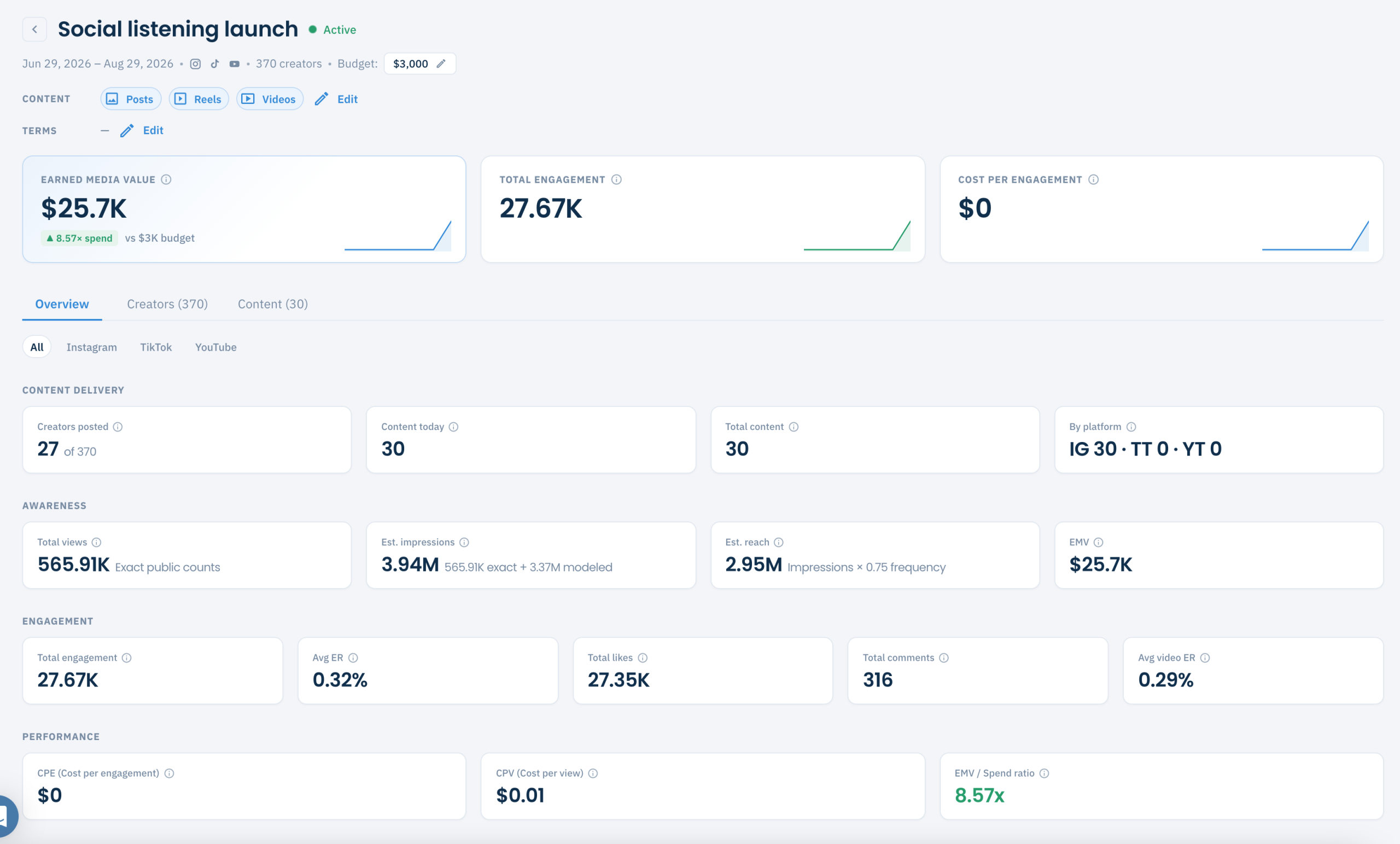
One campaign, fully measured — content delivery, awareness, engagement and cost performance.
Performance that adds up
Every campaign rolls up into Overview, Creators and Content views, so you can see the whole picture or drill into a single post.
Add a budget and you also get Cost per Engagement, Cost per View and an EMV / Spend ratio.
An AI report you can actually edit
Add an optional brief and the AI Report writes a narrative you can rework — summary, sentiment, top content, creator ranking and recommendations.
- Editable draft, not a locked PDF
- Exports to Google Docs or Word (.docx)
- Reads from your brief to frame the story
How it works
From handles to insight in four steps.
Create
Set a name, platforms, date range and what to track — hashtags, mentions or keywords.
Add creators
Pull from saved lists, paste @handles, or upload a CSV.
Track
New posts are detected automatically and scored as they land.
Report
Review the metrics and export an editable AI narrative.
Over the API
Real-time tracking, delivered to your endpoint.
Subscribe to the creators you care about and receive structured events at your own notify endpoint — ready to route into Slack, a database, a report, or an AI agent. One subscription can span creators added by handle or pulled from your saved lists.
{
  "creators": ["@maya.styles", "@theojruns"],
  "events": ["new_post", "follower_threshold"],
  "keywords": ["summer", "#ad"],
  "notify_url": "https://app.acme.com/ic/hook"
}

# → event delivered to your endpoint:
{
  "event": "new_post",
  "creator": "@maya.styles",
  "platform": "instagram",
  "delivery": { "status": "sent", "retries": 0 }
}
Four event types
Subscribe to any combination and handle them however you like.
Built for real traffic
- Delivery to your own notify endpoint
- Automatic retries on failure
- Delivery history: status, latency, retry count and payload
- Export subscription stats to CSV
Campaigns and the API, together
Dashboard campaigns set up their monitoring for you under the hood — pause and resume follow the campaign. Prefer to wire it yourself? Standalone webhook subscriptions work directly over the API for any non-campaign use.
Full reference: Campaigns, Subscriptions and Events.
Is this for you?
Built for teams that need results, not busywork.
Campaign Tracking fits whether you’re a brand measuring a launch, an agency reporting to clients, or a team wiring creator data into your own product.
- Running multiple campaigns across Instagram, TikTok and YouTube
- Reporting earned media value and engagement to clients or leadership
- Tired of chasing creators for screenshots and analytics
- Working with dozens or hundreds of creators at once
- Building creator data into your own dashboards or AI tools
- Wanting alerts the moment a tracked creator posts or changes
FAQ
Questions, answered.
How does campaign tracking collect creator content?
Once you add creators to a campaign, new publicly available posts they publish are picked up automatically across Instagram, TikTok and YouTube — usually within about an hour. You can track by hashtag, @mention or keyword, and there’s nothing for the creator to install or sign up for.
Do creators need to sign up or connect their accounts?
No. Creators post as they normally would. Tracking works from publicly available content, so there’s no creator sign-up, login or authentication required on their side.
What content can be tracked?
Publicly available posts from the creators in your campaign on Instagram, TikTok and YouTube. Private accounts, content shared privately and posts that were never made public aren’t included — only what’s publicly accessible on each platform.
Which metrics do I get?
Earned media value, total and average engagement rate, views, estimated impressions and reach, likes and comments. Add a budget and you also get cost per engagement, cost per view and an EMV-to-spend ratio — all calculated for you, per post, per creator and per campaign.
Can I get the data over an API?
Yes. Subscribe to the creators you care about and receive structured events at your own notify endpoint — new post, bio change, link-in-bio change and follower-threshold events. For new-post triggers you can narrow by keyword, hashtag, mention and post type. Deliveries retry automatically, and a delivery history records every event with its status, latency, retry count and payload. Everything is in the public API docs.
Can I export reports?
Yes. Each campaign generates an editable AI report — summary, sentiment, top content, creator ranking and recommendations — that exports to Google Docs or Word. It’s a draft you can rework, not a locked file.
See your next campaign in real time.
Track creators, measure earned media value and get notified the moment something moves.