
Free Youtube Engagement Rate Calculator
Get Youtube channels’ engagement rate and other metrics for free. No signup.
Sample output for @mkbhd. Run the tool on any YouTube handle for a live report.

Marques Brownlee
@mkbhd
Get EmailBio
MKBHD: Quality Tech Videos | YouTuber | Geek | Consumer Electronics | Tech Head
- Name
- Marques Brownlee
- Location
- United States
- Language
- English
- Business Category
- Technology
- Followers
- 21.1M
- Engagement Rate
- 3.13%
- Number of Posts
- 1,841
- Average Views
- 3.9M
- Posts per Month
- 5.3
- Average Short Plays
- 4.1M
- Average Likes
- 117.6k
- Average Comments
- 5.1k
Platforms used
Links in bio
Estimated Revenue
Monthly
$160,000 – $250,000
Revenue Range
Similar Accounts

Jonathan Morrison
- Followers
- 2.5M
- Engagement Rate
- 0.09%

The Verge
- Followers
- 3.5M
- Engagement Rate
- 0.01%

SuperSaf
- Followers
- 2.2M
- Engagement Rate
- 0.07%

EverythingApplePro
- Followers
- 7.9M
- Engagement Rate
- 0.18%

Mrwhosetheboss
- Followers
- 22.7M
- Engagement Rate
- 0.65%

Snazzy Labs
- Followers
- 1.3M
- Engagement Rate
- 0.66%
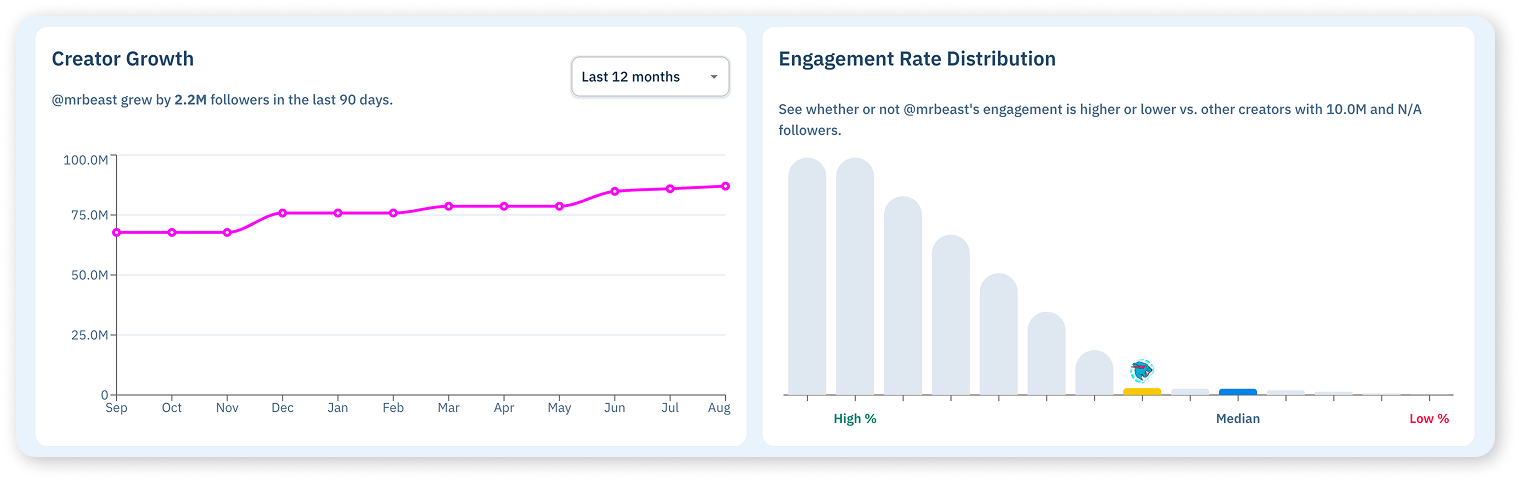
Creator Growth
@mkbhd grew by 190.0k followers in the last 90 days.
Engagement Rate Distribution
See whether or not @mkbhd's engagement is higher or lower vs. other creators in the same follower band.
Audience Insights
Categories derived from bio, hashtags & language signals
Audience Credibility
Scored against creators in the 21.1M follower band.
Top Locations
+11 more countries
Age & Gender
Audience Interests
+21 more interest categories
Tagged Creators
 waveform
 autofocus
Tagged Brands
 dbrand3 post(s)
 ridge2 post(s)
 anker1 post(s)
Hashtags
Sample report shown for illustration. Run the tool above for a live report.
The basics
What is YouTube engagement rate?
YouTube engagement rate is the share of viewers who liked or commented on a channel’s videos, shown as a percentage. It adds up likes and comments across recent videos, averages them per video, divides by average views and multiplies by 100. Views are the denominator rather than subscribers because a video’s audience on YouTube comes largely from search and recommendations, not from the subscriber list.
YouTube engagement runs lower than short-form platforms, and that is not a problem. Watching a ten-minute video is itself the commitment, and most viewers leave without pressing anything. The rate that matters is read alongside a second number: how many of a channel’s subscribers actually show up when a video goes live. A channel with 200k subscribers and 4k average views is a very different buy from one with 50k subscribers and 40k views.
(likes + comments) ÷ views × 100
The core formula. Everyone in the denominator watched at least part of the video, so the rate measures how many viewers reacted. Average across recent uploads, and keep Shorts and long-form separate.
average views ÷ subscribers × 100
The second number every YouTube deal should be priced on. It tells you what share of the subscriber base still watches, which is the difference between a live channel and one coasting on a subscriber count earned years ago.
Inside the result
What the YouTube engagement rate calculator shows you
A YouTube engagement rate without average views and subscribers next to it is half a number. The calculator returns all three, with the metrics that explain them.
The rate, with views and subscribers behind it
You get the view-based engagement rate averaged across the channel’s recent videos, next to average views, likes and comments per video, upload frequency and subscriber count. Average views tells you the real audience per upload; the view-to-subscriber ratio tells you whether the subscriber count still means anything.
- Engagement rate
- Subscribers
- Average views
- Average likes
- Average comments
- Videos per month
- Total videos
Upload consistency matters on YouTube more than anywhere else. A channel that posts weekly with steady views is a partner you can plan a campaign around. One that posts in bursts, with views that swing tenfold between uploads, is a much riskier placement at the same headline rate.

Where the rate sits against YouTube channels of the same size
A 4% engagement rate on a channel with 3M subscribers is a different signal from 4% on a channel with 20k. The calculator places the channel on an engagement rate distribution built from YouTube channels in the same subscriber band, so “is this good” gets answered for that size on that platform.
Next to it you get the subscriber curve over the last 12 months and the subscribers added in the last 90 days. YouTube channels often carry a subscriber count that stopped growing years ago, so the shape of the curve, and whether views have kept pace with it, tells you if you are looking at a live audience or a historical one.
Every account the creator runs, not just the YouTube channel
Most YouTube engagement rate calculators check one channel and stop. This one resolves the creator behind the handle and shows every account connected to them, with follower counts on each. A YouTuber with modest long-form engagement may be running a large Instagram or TikTok audience on the side, or the reverse, and the whole footprint is what you are negotiating with.
Matching runs against 340M+ creator profiles, with connected accounts tracked across 47 platforms, which is why the result finds channels a single YouTube search never surfaces.
- Linked accounts
- Followers per platform
- Public bio
- Links in bio
- Location
- Language

Benchmarks
What is a good YouTube engagement rate?
There is no single good YouTube engagement rate, and any calculator that hands you one is guessing. Three things move the benchmark.
Long-form versus Shorts
Shorts collect views at TikTok scale and engagement at TikTok rates; long-form videos collect fewer views and fewer interactions per view, but each one represents minutes of attention rather than seconds. Mixing the two in one average produces a number that describes neither.
Compare long-form to long-form and Shorts to Shorts, and price the format you are actually buying.
Channel size
Rates fall as channels grow, and the view-to-subscriber ratio falls faster, because large channels accumulate subscribers who no longer watch. A small channel where most subscribers see every upload can have both a higher rate and a healthier ratio than a channel a hundred times its size.
Benchmark against YouTube channels in the same subscriber band, and read the ratio alongside the rate.
Category
Gaming, commentary and entertainment channels draw comments because the audience talks back. Tutorials, reviews and education get watched to the end and rarely commented on. Rates in how-to categories run lower without meaning the audience is less valuable, and often the opposite for a product placement.
Judge the rate against channels in the same category, and weigh watch behaviour over comment volume for how-to and review content.
This is why the calculator does not hand you a fixed target. It shows where the channel sits against other YouTube creators of the same size, drawn from the full dataset, so the benchmark is the one that applies to that channel rather than to an average of the whole platform.
How to use it
Calculate a YouTube engagement rate in three steps
-
Paste the YouTube handle
The channel’s @handle, or the channel URL. No account, no credit card, no trial clock.
-
Read the rate next to the view-to-subscriber ratio
The rate tells you how viewers react; the ratio tells you whether the subscriber count is still an audience. You need both before the number means anything.
-
Check the subscriber band and upload consistency
See where the rate sits against channels of the same size, then confirm that uploads are regular and views hold steady from one to the next.
Reading the number
Five ways YouTube engagement rate gets misread
YouTube has the most misleading vanity number of any platform, the subscriber count. These are the five mistakes that follow from it.
-
Mixing Shorts and long-form in one average
A channel that posts one Short a day and one long video a week will show Shorts-scale views and Shorts-scale engagement. Separate the two, or you are pricing a long-form placement on Shorts numbers.
-
Judging the channel by subscribers
Subscribers on YouTube are cumulative and never leave on their own. A 2M-subscriber channel with 30k average views is a 30k-view buy. Price on views.
-
Reading one breakout video
One video picked up by recommendations can pull 5M views on a channel that averages 50k. Look at the spread across recent uploads, and check the median against the mean.
-
Ignoring the view-to-subscriber ratio
A low ratio means the subscriber base has moved on. It is the fastest way to tell a live channel from a channel with a large number on its banner and nobody watching.
-
Overlooking upload gaps
A channel that went quiet for six months and came back has a different audience than the one it built. Check that recent uploads, not lifetime uploads, are what the averages are built from.
The data
Where the numbers come from
Every calculation is built from publicly available information, collected and analyzed from public sources across the open internet, plus partners who provide publicly available data. Nothing behind a login.
Views, likes, comments, subscriber counts and upload history track the creator’s public YouTube channel and are refreshed weekly. Benchmarks are built by placing the creator against other public YouTube profiles in the same follower band across the full dataset. Audience insights, where shown, are modeled by analyzing a creator’s public engagers over time rather than copied from anyone’s private dashboard.
The dataset behind the tool holds 340M+ creator profiles. Six platforms carry full profile and audience data (Instagram, TikTok, YouTube, X, Twitch and OnlyFans) and connected accounts are tracked across 47 in total. Profiles refresh weekly, and again whenever you export them.
The same data powers the Influencers.club dashboard and our API. This calculator is a single-profile window into it. Full sourcing and refresh detail sits on our data page.
Free tool vs account
What an account adds
The calculator checks one creator at a time. An account turns the same data into a workflow.
| Capability | Free calculator | Influencers.club account |
|---|---|---|
| Engagement rate, averages and growth history | Yes | Yes |
| Benchmark against the same follower band | Yes | Yes |
| Connected accounts across 47 platforms | Yes | Yes |
| Audience credibility, locations and interests | Locked preview | Full access |
| Filter 340M+ creators by engagement rate | Not included | Yes, with 40+ filters |
| Check engagement on a list of creators at once | One at a time | Bulk, with export |
| Track engagement over time | Not included | Yes |
| API access | Not included | Pro plans |
Find creators by engagement rate, not just check it
This calculator reads one creator. An account lets you search 340M+ profiles across six platforms with engagement rate as a filter, enrich a list you already have with the same metrics and contact info, and track the creators you work with as their numbers move.
Every account starts with free credits, so you can run it on your own shortlist before you talk to anyone.
Other platforms
Engagement rate calculators for every platform
Each platform counts engagement differently, so each calculator applies the formula that fits it.
 Instagram engagement rate calculator
 TikTok engagement rate calculator
 X (Twitter) engagement rate calculator
 Twitch profile analyzer
 OnlyFans profile analyzer
FAQ
Frequently asked questions
Is the YouTube engagement rate calculator free?
Yes. Paste a YouTube handle or channel URL and the engagement rate, view-to-subscriber ratio, averages, growth history and connected accounts appear with no signup, no trial and no credit card. Audience data shows as a locked preview. Unlocking it takes an Influencers.club account, which starts with free credits, so that part is free too.
How do you calculate YouTube engagement rate?
(likes + comments) ÷ views × 100, averaged across the channel’s recent videos rather than taken from one. Views are the denominator because most YouTube reach comes from search and recommendations rather than the subscriber list. The calculator also reports the view-to-subscriber ratio, average views ÷ subscribers × 100, because on YouTube that number is as important as the rate itself.
How do I calculate YouTube engagement rate manually?
Take the channel’s last ten or so videos, add up the likes and comments on each, divide by the number of videos to get an average, then divide that average by the average views and multiply by 100. Keep Shorts and long-form videos separate. The calculator does this for you and adds the benchmark against YouTube channels of the same size, which is the part you cannot do by hand.
What is a good engagement rate on YouTube?
It depends on channel size, category and whether you are looking at long-form videos or Shorts. YouTube rates run lower than on short-form platforms because watching a long video is itself the commitment and most viewers leave without reacting. The view-to-subscriber ratio is often the more revealing number. The calculator shows an engagement rate distribution, placing the channel against other YouTube creators in the same subscriber band, so you get the answer for that channel rather than in the abstract.
What is a good view-to-subscriber ratio on YouTube?
It falls as channels grow, because subscribers accumulate and stop watching over time. A small channel where most subscribers watch every upload is healthy; a large channel where a small fraction do is normal, not broken. What you want to see is a ratio that holds steady over recent uploads rather than sliding, and views that grew alongside the subscriber count rather than staying flat while it climbed.
Should Shorts and long-form videos be measured together?
No. Shorts collect views and interactions at short-form scale and rates; long-form videos collect fewer of both per video but represent far more watch time each. Averaging the two produces a number that describes neither. Measure the format you are buying.
Why is my rate different from YouTube Studio?
YouTube Studio counts data that is not public, such as watch time, impressions, click-through rate and unique viewers. Public calculators can only use public views, likes, comments and subscriber counts. The numbers will differ, and that is expected. What matters is that the same public formula is applied to every channel, so creators are comparable with each other.
Does a high YouTube engagement rate mean the subscribers are real?
Not on its own. The signals to read alongside the rate are the view-to-subscriber ratio, where a large subscriber count with tiny views is the tell, the subscriber curve, and the audience credibility score, which is benchmarked against YouTube channels in the same subscriber band. The YouTube channel analyzer puts all of them on one page.
Can I check engagement rate for many YouTube channels at once?
The free calculator runs one channel at a time. An Influencers.club account lets you upload a list of YouTube creators and get engagement rate and supporting metrics on all of them, or search 340M+ profiles with engagement rate as a filter and export the results. Accounts start with free credits.
Can I get YouTube engagement rate through an API?
Yes. Engagement rate and every supporting metric on this page are available through the Influencers.club API as structured JSON, across 19 documented endpoint groups covering discovery, profile metrics, audience data, contact info and creator tracking. Onboarding is self serve with free credits. API access comes with Pro plans.
How is this different from the YouTube channel analyzer?
This calculator is focused on the engagement rate, the view-to-subscriber ratio and the numbers that explain them. The YouTube channel analyzer runs the full profile report on the same channel: estimated revenue, audience credibility, top locations, interests, tagged brands and similar channels. Start here if you want the rate; go there if you want everything.